

In 2026, disconnected systems remain one of the biggest hidden threats to business growth. Sales, marketing, support, and finance teams still waste hours switching between platforms, manually updating data, and chasing information that should be instantly available.
The result? Lost productivity, slower decision-making, frustrated customers, and missed revenue opportunities.
Salesforce Integration Services solve this challenge by connecting your CRM with the rest of your business tools, creating a seamless, real-time flow of data and automating critical workflows.
Whether you’re running an enterprise or a fast-growing mid-sized business, the right Salesforce integrations can transform your CRM from a simple sales tool into the powerful central nervous system of your entire operation.
In this guide, we reveal the Top 10 Salesforce Integration Services that deliver the highest ROI in 2026. From ERP and marketing automation to accounting, e-commerce, and AI-powered platforms, you’ll discover exactly which integrations matter most and how to implement them effectively.
What Are Salesforce Integration Services?
Salesforce Integration Services are specialized solutions that connect your Salesforce CRM with other business applications, enabling smooth, real-time data exchange and automated processes across your entire technology stack.
In today’s fast-paced business environment, companies use multiple software tools, ERP, marketing automation solution, e-commerce solution, accounting, support, and collaboration platforms. Without proper integration, these systems operate in isolation, leading to data silos, manual work, and inefficiency. Salesforce Integration Services eliminate these problems by creating seamless connections between Salesforce and your other critical systems.
How Salesforce Integrations Work
Salesforce integrations typically happen in two main ways:
Direct API Integration: Using Salesforce’s robust set of APIs (REST API, SOAP API, Bulk API, Streaming API, etc.), applications can communicate directly with Salesforce in real time. This approach offers high speed and flexibility for custom requirements.
Middleware Integration: For complex setups involving multiple systems, middleware platforms act as an intelligent central layer. They manage data transformation, routing, error handling, and synchronization between Salesforce and other tools.
Key Reasons Why Businesses Need Salesforce Integrations
Here are the most important reasons forward-thinking companies are investing in Salesforce integrations:
- Eliminate Data Silos: When customer data is scattered across different platforms, teams work with incomplete or outdated information. Salesforce integrations create a single source of truth, ensuring everyone from sales and marketing to support and finance sees the same real-time data.
- Save Time and Boost Efficiency: Employees no longer waste hours manually copying data between systems. Automation handles repetitive tasks, freeing your team to focus on high-value activities like closing deals and serving customers.
- Deliver Seamless Customer Experiences: Modern customers expect consistency. They don’t want to repeat their details every time they interact with a different department. Integrated systems give every team full 360° customer visibility, resulting in faster responses and higher satisfaction.
- Enable Powerful Automation: True automation only works when systems are connected. For example, a closed deal in Salesforce can automatically create an order in your ERP, generate an invoice in accounting software, and notify the support team — all without human intervention.
- Make Better, Faster Decisions: Accurate, real-time data across systems leads to reliable reporting and analytics. Leaders can track performance, spot trends, and make confident decisions instead of guessing.
- Reduce Operational Costs: Manual data entry and errors are expensive. Well-implemented Salesforce Integration Services significantly cut down on mistakes, rework, and operational waste.
- Scale Without Chaos: As your business grows, the number of tools you use increases. Proper integrations help you scale smoothly without creating a messy, unmanageable technology stack.
The Bottom Line:
Without Salesforce integrations, your CRM remains just a sales tool. With the right integrations, it becomes the powerful central hub that drives your entire business operations, improves customer experience, and accelerates growth.
Top Benefits of Salesforce Integrations
- Unified Customer View (360° Customer Profile) All teams — sales, marketing, service, and finance — work from the same real-time customer data. No more conflicting information or blind spots. This leads to better personalization, faster issue resolution, and stronger customer relationships.
- Dramatic Improvement in Operational Efficiency Eliminate repetitive manual data entry, copying, and pasting between systems. Automation handles routine tasks, allowing your team to focus on high-value work like building relationships and closing deals.
- Accurate Analytics and Reporting When data flows seamlessly between platforms, your reports become reliable. Gain clear insights by combining CRM data with marketing, financial, and operational information for better decision-making.
- Powerful Workflow Automation Automate end-to-end business processes. For example, a closed-won deal in Salesforce can automatically create orders in your ERP, generate invoices in accounting software, and notify the delivery team.
- Higher Customer Satisfaction and Retention Support and sales teams can access complete customer history instantly. This enables faster, more informed responses, resulting in better experiences and increased loyalty.
- Faster Revenue Cycles Streamlined processes like quote-to-cash, lead-to-opportunity, and order fulfillment significantly reduce cycle times and improve cash flow.
- Reduced Errors and Operational Costs Manual data handling often leads to costly mistakes. Integrations minimize human error, reduce rework, and lower operational expenses.
- Scalable Business Growth As your company expands and adds new tools, a well-built integration architecture allows you to scale without creating chaos or increasing complexity.
- Better Team Collaboration Connect Salesforce with tools like Slack, Microsoft Teams, or Google Workspace so teams receive real-time updates and notifications where they already work.
- Competitive Advantage Businesses with strong Salesforce integrations respond faster to market changes, deliver superior customer experiences, and make smarter strategic decisions.
Top 10 Salesforce Integration Services in 2026
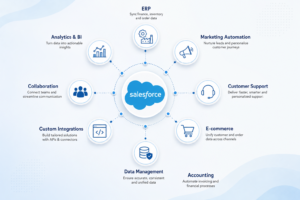
In 2026, choosing the right Salesforce Integration Consultant Company can dramatically impact your business efficiency, revenue growth, and customer experience. Not all integrations deliver the same value.
1. ERP Integration
Connecting Salesforce with ERP systems like SAP, Oracle, Microsoft Dynamics 365, or NetSuite is often the most impactful integration. It synchronizes customer data, inventory, orders, and financials in real time.
Benefits: Faster order-to-cash cycles, accurate inventory visibility for sales teams, and fewer fulfillment errors.
2. Marketing Automation Integration
Integrate Salesforce with platforms like Salesforce Marketing Cloud, HubSpot, Marketo, or Pardot.
Benefits: Closed-loop reporting, better lead scoring, personalized campaigns, and improved MQL-to-SQL conversion rates.
3. Customer Support Integration
Connect Salesforce with Zendesk, ServiceNow, Freshdesk, or Salesforce Service Cloud.
Benefits: Support agents get complete customer context instantly, leading to faster resolution times and higher customer satisfaction (CSAT) scores.
4. E-commerce Integration
Sync your online store (Shopify, Magento, BigCommerce, WooCommerce, or custom platforms) with Salesforce.
Benefits: Real-time order and customer data sync, unified customer profiles, and personalized shopping experiences for B2C and D2C brands.
5. Accounting Software Integration
Integrate with QuickBooks, Xero, NetSuite, or Sage.
Benefits: Automatic invoice creation, accurate revenue recognition, streamlined financial reporting, and better cash flow visibility.
6. Data Synchronization & Master Data Management
Ensure consistent, real-time synchronization of customer, product, and operational data across all systems.
Benefits: Eliminates duplicate records, maintains data accuracy, and creates a reliable single source of truth.
7. API-Based Custom Integration
Leverage Salesforce’s powerful REST, SOAP, Bulk, and Streaming APIs for custom integrations.
Benefits: Maximum flexibility and performance for unique business processes and niche applications.
8. Middleware Integration (iPaaS)
Use enterprise middleware platforms like MuleSoft, Boomi, or Workato to manage multiple integrations.
Benefits: Centralized control, easier scalability, complex data transformation, and reduced integration complexity.
9. Collaboration Tools Integration
Connect Salesforce with Slack, Microsoft Teams, Google Workspace, or Outlook.
Benefits: Real-time notifications, faster internal communication, and improved team productivity.
10. Analytics & Business Intelligence Integration
Connect with Tableau, Power BI, Looker, or Einstein Analytics.
Benefits: Advanced reporting, cross-system insights, predictive analytics, and smarter data-driven decisions.
Real-World Salesforce Integration Use Cases
Concepts are useful, but real results speak louder. Here are real-world Salesforce integration use cases from different industries that delivered impressive business outcomes in 2026. Many businesses hire Salesforce developers to streamline implementation, accelerate ROI, and ensure smooth system integration across multiple platforms.
1. Manufacturing Company: ERP Integration with SAP
Challenge: Sales team couldn’t see real-time inventory or production schedules, leading to delayed quotes and frequent order errors.
Solution: Integrated Salesforce CRM with SAP ERP using MuleSoft middleware.
Results:
- Quote-to-order time reduced by 35%
- Order accuracy improved by 28%
- Sales reps can now promise realistic delivery dates with confidence
- Significant reduction in fulfillment issues and customer complaints
2. B2B SaaS Company: Marketing Automation Integration
Challenge: Marketing and sales teams worked in silos — HubSpot and Salesforce data were not synchronized.
Solution: Built a bidirectional integration between HubSpot and Salesforce.
Results:
- MQL-to-SQL conversion rate increased by 42% in just 3 months
- Marketing ROI became clearly measurable
- Sales reps gained complete lead history and engagement data
- Marketing team could optimize campaigns based on actual revenue impact
3. D2C Retail Brand: E-commerce + Support Integration
Challenge: Customer data was scattered between Shopify, a loyalty program, and Zendesk support.
Solution: Integrated Shopify, Zendesk, and loyalty platform with Salesforce Service Cloud and Commerce Cloud.
Results:
- Repeat purchase rate increased by 24%
- Average order value grew by 19%
- Customer support resolution time reduced by 31%
- Personalized marketing campaigns based on complete purchase + support history
4. Professional Services Firm: Accounting + Collaboration Integration
Challenge: Finance team had no visibility into sales pipeline, and project updates were delayed.
Solution: Integrated Salesforce with Xero (accounting) and Slack (team communication).
Results:
- Automatic invoice creation from closed deals
- Real-time project notifications in Slack
- Finance team gained live revenue forecasting
- Improved cash flow and reduced billing delays
These Salesforce integration use cases prove that the right connections deliver fast, measurable returns, whether you want to speed up operations, increase revenue, or improve customer experience.
Every business is unique. The key to success is identifying your biggest operational bottleneck and starting with the integration that solves it.
Future Trends in Salesforce Integrations for 2026 and Beyond
The Salesforce integration landscape is evolving rapidly. In 2026, businesses that embrace the latest integration trends will gain a significant competitive advantage through greater speed, intelligence, and flexibility.
1. AI-Powered Intelligent Integrations
Artificial Intelligence is transforming how integrations are built and managed. Salesforce Einstein and third-party platforms now automatically suggest integration mappings, detect data anomalies, predict failures, and even recommend new automation opportunities.
Impact: Faster implementation, reduced developer dependency, and self-healing integration flows.
2. Real-Time Event-Driven Architectures
Batch processing is becoming outdated. In 2026, event-driven integrations using platforms like MuleSoft, Kafka, and Salesforce Event Bus are the new standard. Systems react instantly to events such as a closed deal, inventory update, or customer complaint.
Impact: Ultra-responsive customer experiences and dramatically faster business processes.
3. Hyperautomation with Low-Code/No-Code Tools
The rise of intelligent automation platforms (Workato, Zapier, MuleSoft Composer) allows citizen developers to build complex integrations with minimal coding. Generative AI now helps write integration logic based on plain English descriptions.
Impact: Faster deployment and greater agility for business teams.
4. Composable Enterprise Architecture
Businesses are moving away from rigid, monolithic systems toward modular, API-first “composable” architectures. This allows companies to swap or upgrade individual components without disrupting the entire ecosystem.
Impact: Lower risk, reduced costs, and future-proof technology stacks.
5. Unified Data Platforms & Customer 360
Salesforce Data Cloud (formerly CDP) is becoming the central brain for integrations. More companies are building a complete 360° customer view by connecting every touchpoint in real time.
Impact: Hyper-personalization and predictive customer experiences.
Ready to transform your Salesforce into a powerful business operating system?
Get in touch with our Salesforce integration experts today for a free consultation and custom integration roadmap tailored to your business goals.
The future belongs to connected businesses. Make sure yours is one of them.
Design a Smarter Integration Strategy for Your Business

FAQs
+
Salesforce offers multiple APIs, including:
- REST API (most popular)
- SOAP API
- Bulk API (for large data volumes)
- Streaming API (real-time updates)
- Metadata API
- Tooling API
- Composite API
The right API depends on your use case and data volume.
+
For small and mid-sized businesses, the top recommended tools are:
- Zapier (easiest)
- Make
- Workato
- Native Salesforce Flow
These offer good functionality with minimal coding required.
+
Salesforce Integration API = Direct technical connection method (REST, SOAP, etc.)
Salesforce Integration Platform = Complete solution (like MuleSoft or Boomi) that includes tools for data mapping, orchestration, monitoring, error handling, and managing multiple integrations centrally.