Stop manually copying Salesforce data into Word and Excel. Perigeon delivers expert Conga Composer implementation—automating complex quotes, proposals, and reports with pixel-perfect accuracy and 1-click generation.
What Is Conga Composer, and Why Do Salesforce Teams Need It?
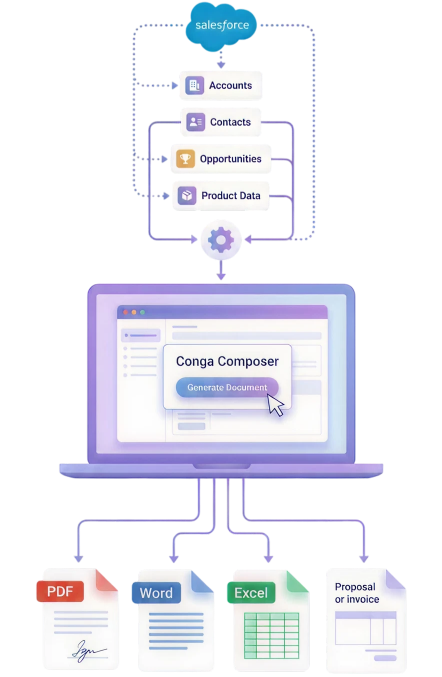
Conga Composer is the industry-leading document generation engine for Salesforce. It allows your teams to generate highly formatted, branded documents—like complex quotes, proposals, Account Plans, and invoices—directly from Salesforce data with a single click.
While Salesforce is a powerful CRM, its native document generation is severely limited. When standard admins try to pull related lists, nested product data, or multi-object relationships, they hit a wall. Sales reps are forced to manually copy and paste data from Salesforce into Word or Excel, leading to formatting errors, broken branding, and wasted hours.
Perigeon fixes this. We write the advanced SOQL queries required to pull data from anywhere in your Salesforce org, map it into pixel-perfect Word, Excel, PowerPoint, or PDF templates, and automate the delivery.
We bridge the gap between your complex Salesforce data model and the branded documents your customers expect to see. Here is how our certified consultants make it happen.
Template Design & Formatting
Conversion of existing Word, Excel, and PPT files
Pixel-perfect formatting matching your brand guidelines
Dynamic tables for product line items and pricing
Conditional text logic (hide/show sections based on data)
Watermarks, dynamic headers, and page numbering
Complex Data Mapping & SOQL
Advanced SOQL query building for multi-object data
Pulling nested related lists (e.g., Accounts > Opps > Products)
Document automation projects fail when data isn’t mapped properly. We follow a strict technical methodology to ensure your templates pull exactly the right data, every single time.
Step 1
Discovery & Document Audit Process
We start by collecting your “ideal state” documents—the Word, Excel, or PDF files your team currently creates manually. We map every field on those documents to your Salesforce data model, identifying where custom SOQL queries will be needed to bridge any gaps.
Document audit
Data mapping
Salesforce schema review
Step 2
Template Build & Query Mapping
The heavy technical lifting. Our consultants build out the Conga templates, embedding merge fields and conditional logic. Simultaneously, we write the advanced SOQL queries required to pull cross-object data, related lists, and nested hierarchies perfectly into the template structure.
SOQL writing
Template formatting
Merge field embedding
Conditional logic
Step 3
Automation & Flow Setup Process
We design the user experience. Whether it’s placing a “Generate Proposal” button on the Opportunity layout, setting up a background Salesforce Flow to auto-email an invoice upon status change, or configuring Conga Batch to run 500 renewal notices every Friday.
Button configuration
Salesforce Flows
Conga Batch
Email templates
Step 4
UAT, Edge-Case Testing & Go-Live
We run your templates against your messiest Salesforce records to ensure tables format correctly, text doesn’t overflow, and missing data doesn’t break the document. Once approved, we deploy to production and train your admins on how to update static text in the future.
Edge-case testing
Production deployment
Admin handover
Post-live support
Endless Use Cases
What Can You Automate with Conga Composer?
Any document that requires data from Salesforce can be automated. Here’s how different departments leverage Perigeon’s Conga Composer implementations.
Sales & RevOps
Complex CPQ Quotes & Proposals
Statements of Work (SOWs)
Order forms with dynamic terms
Finance
Batch generation of invoices
Dynamic payment receipts
Collections and dunning letters
Customer Success
PowerPoint Account Plans
Quarterly Business Reviews (QBRs)
Automated renewal notices
Legal & Ops
Standardized NDAs and MSAs
Shipping manifests & labels
Compliance and audit reports
Vertical Expertise
Conga Composer Solutions by Industry
Different industries require wildly different outputs. Our consultants have built complex document generation architectures for highly regulated and specialized sectors.
Financial Services & Wealth
Pixel-perfect, highly formatted client wealth reports, portfolio summaries, and welcome packets merging massive amounts of related financial data.
Manufacturing & Logistics
Complex Bills of Materials (BOM), dynamic shipping manifests, routing guides, and multi-page technical specification sheets pulled directly from custom objects.
Healthcare & Life Sciences
HIPAA-compliant patient discharge summaries, clinical trial enrollment forms, and provider directories generated in batches to ensure data accuracy.
Hi-Tech & SaaS
Dynamic software order forms with tiered pricing tables, automated SaaS renewal invoices via Conga Batch, and highly branded sales proposals.
Public Sector & Non-Profit
Automated grant application summaries, donor tax receipt batch generation, and compliance reporting formatted precisely to government standards.
Real Estate & Construction
Automated lease agreements, site inspection reports with embedded images, and dynamic subcontractor Statements of Work (SOWs).
Our Differentiators
Why Choose Perigeon for Conga Composer?
Anyone can map a simple text field to a Word doc. It takes a specialized consultant to build complex, multi-object document architectures that won’t break when your business scales.
Deep SOQL Expertise
We don’t rely solely on Conga’s basic report builder. Our developers write custom, highly optimized SOQL queries to pull nested data from anywhere in your org, bypassing native Salesforce limitations.
Salesforce Flow Masters
We build sophisticated background automations. Instead of users clicking buttons, we use Salesforce Flows to trigger document generation and delivery the moment a record hits a specific stage.
Zero Design Compromise
We don’t force you to change your brand guidelines to fit the software. We map data into your exact existing templates, preserving every watermark, header, footer, and brand color.
Global Delivery Model
Delivery teams across the US and India provide coverage across time zones — so your template fixes are done while you sleep. All communication is handled by a dedicated project manager.
Platform Comparison
Conga Composer vs. Native Salesforce Document Generation
Feature / Capability
Conga Composer (with Perigeon Setup)
Salesforce Native / Basic Generation
Data Source Flexibility
Limitless (Custom SOQL queries from any object)
Limited to standard related records
Output Formats
Word, Excel, PowerPoint, PDF, HTML
Usually restricted to PDF
Batch Generation
Yes (Generate hundreds of docs at once)
No (One at a time)
Background Automation
Yes (Trigger via Salesforce Flow)
Requires manual user clicks
Complex Data Tables
Dynamic grouping, sorting, and math calculations
Basic, static line-item tables
Conditional Logic
Hide/show text blocks based on specific field values
Very basic or unavailable
E-Signature Routing
Seamless routing to DocuSign / Conga Sign
Requires manual download and upload
Frequently asked questions
Can we use our existing branded Word and Excel documents?
Yes. Perigeon takes your exact existing, highly-formatted Word, Excel, PowerPoint, or PDF files and converts them into dynamic Conga templates. Your branding, pixel-perfect formatting, and static text remain untouched, while dynamic fields and tables pull live data directly from Salesforce.
What is the difference between Conga Composer and Conga CLM?
Conga Composer is a powerful document generation engine used to create quotes, invoices, QBRs, and standard contracts with a single click. Conga CLM is a comprehensive contract lifecycle management platform designed specifically for legal teams that need complex redlining, multi-party negotiations, clause fallback libraries, and automated obligation tracking. Perigeon implements both, and we can advise on which tool fits your exact needs.
Can Conga Composer generate documents in batches?
Yes, using an add-on called Conga Batch. We can configure automated workflows that allow your team to generate, attach, and email hundreds of documents at once — such as monthly billing statements, mass renewal notices, or compliance updates — without any manual intervention.
How long does a Perigeon Conga Composer implementation take?
A standard Conga Composer quickstart implementation (focusing on 2-3 core templates like Quotes or Invoices) takes roughly 3 to 4 weeks. For enterprise environments requiring complex SOQL queries, dozens of templates, PowerPoint generation, and automated batch delivery, timelines typically range from 6 to 8 weeks.
How is Conga Composer different from Salesforce OmniStudio Document Generation?
OmniStudio Document Generation is powerful but is typically tied to specific Salesforce Industry Clouds (like Financial Services Cloud or Health Cloud) and relies heavily on OmniScripts and DataRaptors. Conga Composer is generally more flexible across all standard Sales/Service clouds, supports a wider array of output formats (like Excel and PowerPoint), and has a massive ecosystem for add-ons like Conga Sign.
How does the system prevent data duplication?
Data duplication is prevented through:
Trigger-based synchronization tied to Opportunity updates
Structured data mapping between Xvantage and Salesforce objects
Logged sync events to track processed records
Controlled retry logic that avoids reprocessing completed transactions
These safeguards ensure each order and line item is synced once and accurately, maintaining clean and reliable data.
Ready to Automate Your Salesforce Documents?
Talk to a certified Conga Composer consultant at Perigeon. Show us the manual documents your team is struggling with today, and we’ll show you exactly how we can automate them directly from Salesforce.
Turn your Salesforce ideas into real business results
Planning a Salesforce project or exploring ways to improve your existing setup? Let’s connect. Our experts will understand your business goals, evaluate your requirements, and guide you toward the right Salesforce solution—no obligation, just clear direction.
Whether you’re starting fresh or optimizing what you already have, Perigeon is here to help you move forward with confidence.
Perigeon.com uses cookies. We collect statistics and geo graphic data to optimise the site functionality, and deliver the content tailored to your interest. By using our site you agree to our Cookie Policy.