
Here’s the reality—most Salesforce implementations don’t fail on day one. They fail six months later, when the business starts growing and the system can’t keep up.
What begins as a clean setup slowly turns into:
- Overloaded workflows
- Duplicate data everywhere
- Integrations breaking under pressure
- Frustrated users abandoning the system
This is the cost of not having a clear Salesforce platform strategy.
The problem isn’t Salesforce—it’s the lack of planning for scale.
In this guide, we’ll break down how to design a future-ready, scalable Salesforce architecture that grows with your business instead of slowing it down.
What is a Salesforce Platform Strategy?
A Salesforce platform strategy is a long-term blueprint that defines how your Salesforce ecosystem is designed, governed, and evolved over time.
Strategy vs Implementation
Let’s make this simple:
- Implementation = Setting up Salesforce for current needs
- Strategy = Designing Salesforce for future growth and complexity
Without strategy, every new requirement becomes a workaround. With strategy, every new requirement fits into a system that’s built to expand.
Why Scalability Matters in Salesforce
Scalability isn’t just a technical concern—it’s a business necessity.
1. Business Growth
More customers, more processes, more complexity. Your CRM needs to handle that without slowing down.
2. Data Volume Explosion
As records grow into millions, poor data architecture leads to performance issues and reporting delays.
3. Multi-Cloud Expansion
Most organizations eventually expand into:
- Sales Cloud
- Service Cloud
- Marketing Cloud
- Experience Cloud
Without a proper CRM platform strategy, these become disconnected silos.
4. Performance & User Adoption
If Salesforce becomes slow or confusing, users simply stop using it. Scalability directly impacts adoption.
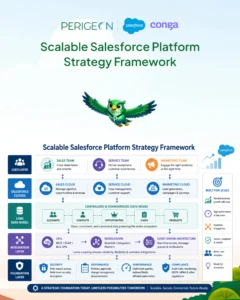
Core Pillars of a Scalable Salesforce Platform Strategy
Let’s break this down into the pillars that matter most.
Data Architecture & Governance
Data is the backbone of your system.
A scalable approach includes:
- Standardized data models
- Clear ownership of data
- Deduplication and validation rules
- Defined lifecycle for records
A strong Salesforce governance model ensures data stays clean as you scale.
Scalable Customization (Low-Code vs Code Balance)
Here’s where many teams go wrong.
Too much low-code (flows, process builder) → performance issues
Too much custom code (Apex) → maintenance complexity
The key is balance:
- Use declarative tools for simple logic
- Use Apex for complex, high-volume processes
- Avoid overlapping automations
Think of it like building a house—don’t use heavy machinery for small tasks, and don’t use hand tools for structural work.
Integration Strategy (APIs & Middleware)
Modern Salesforce setups rarely operate in isolation.
A scalable integration strategy includes:
- API-first design
- Middleware (like MuleSoft or similar platforms)
- Event-driven architecture
- Loose coupling between systems
This prevents one system failure from breaking everything.
Security & Compliance
As your system grows, so do risks.
A scalable strategy ensures:
- Role-based access control
- Field-level security
- Audit trails and monitoring
- Compliance with regulations (GDPR, etc.)
Security should be built in—not added later.
Performance Optimization
Performance is often ignored—until it becomes a problem.
Focus on:
- Efficient data models
- Indexed fields for large datasets
- Optimized queries and reports
- Minimizing automation conflicts
- Scalability means maintaining performance even at scale.
Key Challenges in Scaling Salesforce
Even with the best intentions, teams run into common roadblocks.
- Over-customization → hard to maintain and upgrade
- Poor data quality → unreliable insights
- Lack of governance → inconsistent processes
- Integration bottlenecks → system failures and delays
Here’s the catch: these issues compound over time if not addressed early.
Step-by-Step Framework to Build a Scalable Salesforce Platform Strategy
Now, let’s make this actionable.
1. Assess Your Current Salesforce Setup
Start with a technical audit:
- Identify unused fields and objects
- Review automation conflicts
- Analyze data quality
- Check integration health
- You can’t scale what you don’t understand.
2. Define Long-Term Business Goals
Align your Salesforce platform strategy with business vision:
- Expansion plans
- New product lines
- Geographic growth
- Customer experience goals
- Your architecture should support where you’re going—not just where you are.
3. Design Scalable Architecture
This includes:
- Modular data models
- Clear object relationships
- API-first integrations
- Separation of concerns
Avoid tightly coupled systems—they don’t scale well.
4. Implement a Governance Model
A strong Salesforce governance model defines:
- Who can make changes
- How changes are approved
- Release management processes
- Documentation standards
Without governance, even the best architecture will degrade.
5. Optimize Continuously
Scalability isn’t a one-time project.
- Run regular audits
- Monitor performance
- Refactor outdated automations
- Clean up data
Think of it as ongoing maintenance—not a one-time build.
Role of Automation and AI
Automation is essential—but it must be done right.
Workflow Automation
- Automate repetitive tasks
- Reduce manual errors
- Improve process consistency
Predictive Insights
- Forecast demand
- Identify risks
- Recommend next actions
Reduce Manual Effort
Automation frees teams to focus on high-value work instead of admin tasks.
Real-World Example: Scaling Salesforce Successfully
A mid-sized SaaS company started with a basic Sales Cloud setup.
Initial Challenges
- Duplicate leads across systems
- Manual data entry
- Broken integrations with marketing tools
- Slow reporting performance
What Changed
After implementing a scalable strategy:
- Centralized data architecture
- Introduced middleware for integrations
- Cleaned up automation and workflows
- Implemented governance processes
Results
- 40% improvement in reporting speed
- 30% reduction in manual tasks
- Significant increase in user adoption
- Seamless expansion into Service Cloud
This is what Salesforce scalability looks like in practice.
Best Practices for Long-Term Salesforce Scalability
To keep your system future-ready:
-
Keep your org clean
Regularly remove unused fields, flows, and reports -
Conduct periodic audits
Identify performance and data issues early -
Document everything
Architecture, processes, and integrations -
Invest in user training
A scalable system is only useful if people actually use it
Common Mistakes to Avoid
Let’s be honest—these happen more often than they should.
-
“Build now, fix later” mindset
Technical debt grows fast -
Ignoring scalability early
Retrofitting scalability is expensive -
Lack of stakeholder alignment
Leads to conflicting requirements and chaos
Avoiding these mistakes can save months of rework.
Build a Salesforce Platform That Scales with Your Business.

FAQs
+
+
+
+
+
+
+
Conclusion
A well-defined Salesforce platform strategy is the difference between a system that supports growth and one that blocks it.
Scalability isn’t just about handling more data or users. It’s about:
- Maintaining performance
- Ensuring flexibility
- Supporting innovation
If you plan for scale early, Salesforce becomes a growth engine—not a bottleneck.