

Managing customer information through spreadsheets, emails, and disconnected applications can become challenging as a business grows. Sales teams may miss follow-ups, struggle to track leads, and lack a clear view of their sales pipeline.
Zoho CRM helps businesses centralize customer data, manage sales activities, automate repetitive tasks, and improve customer relationship management. However, getting the most out of the platform requires more than creating an account. Your CRM needs to be configured around your business processes, team responsibilities, and growth objectives.
A well-defined Zoho CRM implementation plan helps you organize this process, avoid common mistakes, and build a CRM system that supports your business as it grows.
In this guide, we explain how to plan your implementation, complete the Zoho CRM setup, configure workflows, migrate existing data, and prepare your team for a successful launch.
What Is Zoho CRM Implementation?
Zoho CRM implementation is the process of configuring and deploying Zoho CRM to support your business operations, sales processes, and customer management requirements.
It involves more than setting up user accounts or importing contacts. A successful implementation ensures that the CRM reflects how your business captures leads, manages opportunities, communicates with customers, and measures performance.
A typical Zoho CRM implementation includes:
- Business process planning: Defining how leads, contacts, accounts, and deals move through your sales process.
- CRM configuration: Setting up modules, fields, layouts, views, and sales pipelines.
- User management: Configuring roles, profiles, and data access permissions.
- Data migration: Cleaning and importing customer records from spreadsheets or existing CRM systems.
- Workflow automation: Automating lead assignment, follow-up reminders, notifications, and routine tasks.
- Application integration: Connecting Zoho CRM with email, accounting, marketing, support, or other business applications.
- Reports and dashboards: Creating reports to monitor sales performance and business KPIs.
- User training: Preparing employees to use the CRM consistently.
The implementation scope depends on your business size, existing systems, data quality, and customization requirements.
Why Do You Need a Zoho CRM Implementation Plan?
A clear implementation plan helps avoid poor configuration, messy data, unnecessary customization, and low user adoption.
1. Align CRM with Business Goals
Define objectives such as improving lead conversion, tracking sales, and managing customer relationships.
2. Standardize Sales Processes
Create consistent steps for lead qualification, deal management, and follow-ups.
3. Maintain Data Quality
Clean duplicate and incomplete records before migrating data into Zoho CRM.
4. Automate Repetitive Tasks
Use workflows to automate lead assignment, reminders, notifications, and record updates.
5. Support Business Growth
Configure Zoho CRM to accommodate new users, evolving processes, and future integrations.
What Should a Zoho CRM Implementation Plan Include?
Before starting your Zoho CRM setup, document the project’s scope and requirements.
| Component | What to Plan |
|---|---|
| Business objectives | Goals, challenges, and measurable outcomes |
| Sales process | Lead qualification, deal stages, ownership, and follow-ups |
| CRM configuration | Modules, fields, layouts, and views |
| User access | Roles, profiles, and permissions |
| Data migration | Source systems, field mapping, cleanup, and validation |
| Workflow automation | Triggers, conditions, actions, and notifications |
| Integrations | Applications that need to exchange data |
| Reporting | Sales KPIs, dashboards, and management reports |
| Training and testing | User acceptance testing and onboarding |
| Go-live support | Launch responsibilities, issue tracking, and optimization |
For example, if your primary goal is to improve lead conversion, your implementation plan should prioritize lead capture, lead assignment, qualification criteria, follow-up reminders, and conversion reporting.
This keeps the project focused on business outcomes instead of configuring features that your team may not need.
Step-by-Step Zoho CRM Setup and Implementation
Step 1: Define your business requirements
Start by understanding how your business currently manages customers and sales opportunities.
Discuss the existing process with sales representatives, managers, marketing teams, and other relevant stakeholders.
Document:
- How leads enter your business.
- How leads are qualified and assigned.
- How contacts and accounts are managed.
- How deals progress through the sales pipeline.
- Which activities require automation.
- Which reports managers need.
- Which applications must integrate with the CRM.
Identify the main problems and establish measurable goals for the implementation.
Expected outcome: A requirements document that defines the CRM scope, essential features, integrations, and success criteria.
Explore our Zoho Development services to understand how we can support your requirements.
Step 2: Complete the initial Zoho CRM setup
The initial configuration establishes the foundation for your CRM.
Set up the relevant organization details, including company information, time zone, business hours, fiscal year, and currency settings. Configure administrative access and invite the employees who will use the platform.
Review the available features against your business requirements and selected Zoho CRM edition.
It is also important to establish clear administrative responsibilities so that configuration changes and access requests can be managed appropriately.
For official setup guidance, refer to the Zoho CRM Admin Quick Start guide.
Step 3: Configure CRM modules, fields, and layouts
Zoho CRM includes standard modules such as Leads, Contacts, Accounts, Deals, and Activities. These modules help organize customer information and sales interactions.
Customize the configuration to match your business processes.
For example, a B2B organization may need fields for industry, company size, lead source, qualification status, estimated deal value, expected closing date, and next follow-up.
You may also configure custom fields, layouts, views, and modules where required.
Keep the setup practical. Adding too many fields can make data entry difficult and discourage employees from maintaining accurate records.
Best practice: Start with the information your team needs to qualify leads, manage opportunities, and make decisions. Add more fields as requirements become clear.
Step 4: Set up your sales pipeline
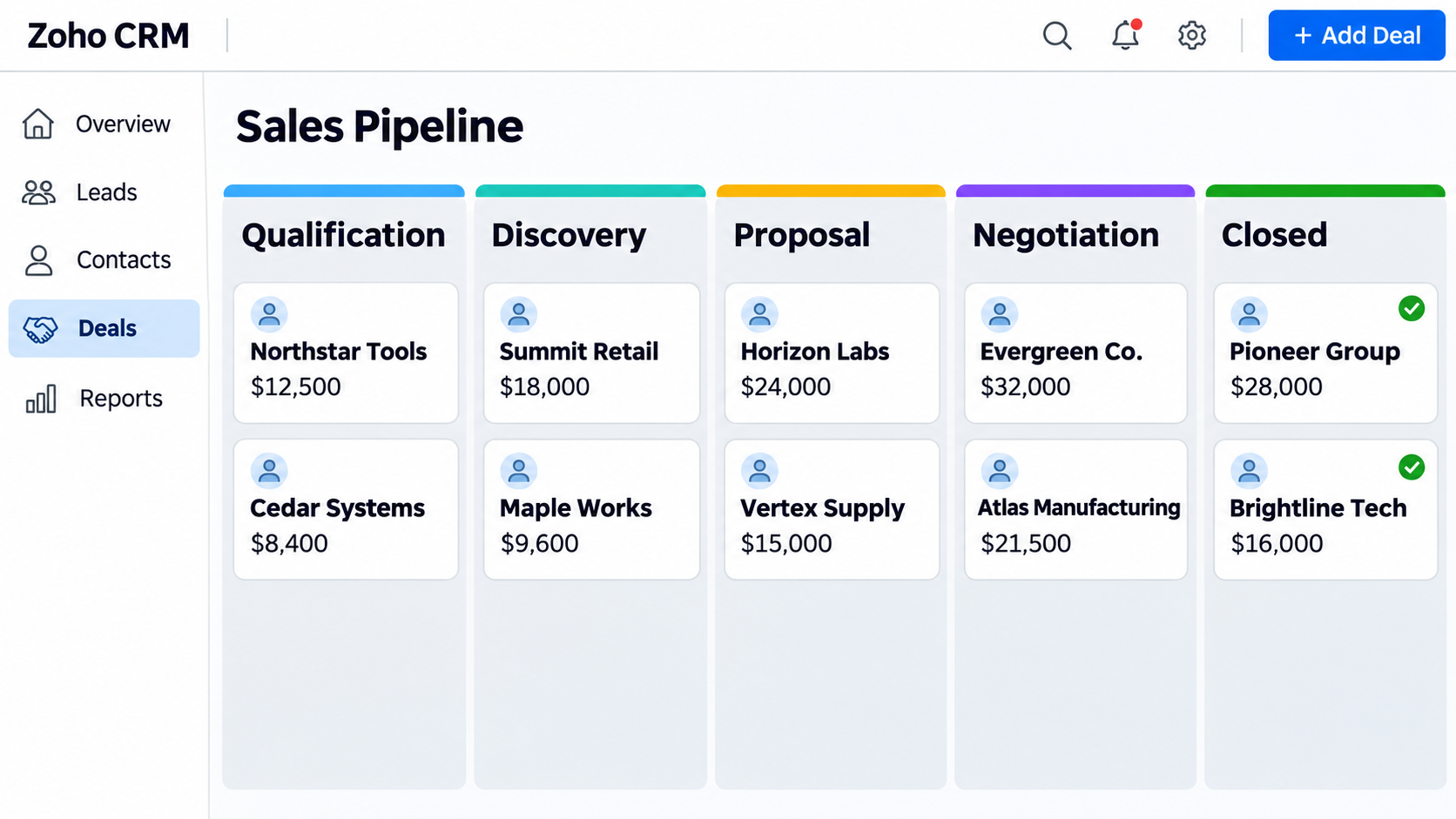
A sales pipeline helps your team track opportunities from initial qualification through to closing.
Define stages that reflect your actual sales process. A typical B2B pipeline might include:
- Qualification
- Discovery
- Proposal
- Negotiation
- Closed Won or Closed Lost
The stages should have clear definitions so that employees understand when an opportunity is ready to progress.
You can also define qualification criteria, ownership rules, and reasons for lost deals. Depending on your requirements and edition, Zoho CRM process management features can help guide users through required steps.
A well-configured pipeline provides better visibility into deal progress, conversion rates, and potential revenue.
Step 5: Configure roles and permissions
Not every employee needs access to every customer record or CRM function.
Configure roles, profiles, and relevant sharing rules according to each user’s responsibilities.
For example, sales representatives may need access to their assigned leads and deals, while managers may require visibility across the team. Administrators need the appropriate access to manage configuration and troubleshoot issues.
Review permissions for sensitive records, data exports, record deletion, and administrative functions.
Test the configuration using representative user accounts before launching the CRM. This helps ensure employees can complete their work without receiving unnecessary access.
Step 6: Clean and migrate existing data
Data migration is a critical stage of Zoho CRM implementation, especially when moving from spreadsheets or another CRM platform.
Importing unverified data can introduce duplicate records, incomplete contact details, and incorrect relationships into the new system.
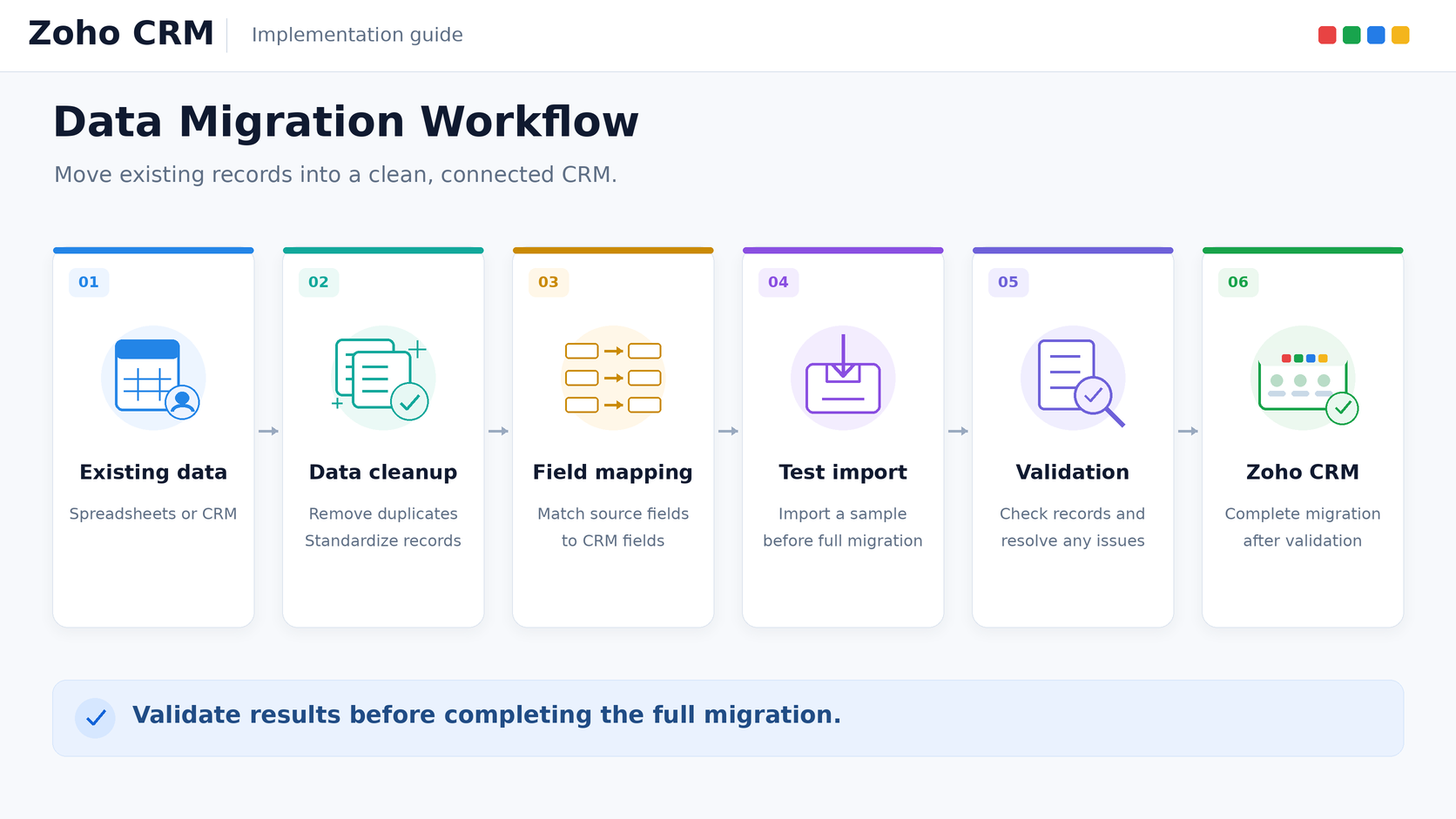
Follow these steps:
- Identify all relevant data sources.
- Remove unnecessary records and duplicates.
- Standardize field formats and values.
- Map existing fields to the correct Zoho CRM modules.
- Validate relationships between accounts, contacts, and deals.
- Perform a test import.
- Check record counts, ownership, and field accuracy.
- Complete the migration after validating the results.
Review how custom fields, attachments, activities, and related records will be handled when migrating from an existing CRM.
Keep a secure backup of your source data and do not retire the old system until the migration has been checked and approved.
For additional guidance, consult the official Zoho CRM data migration documentation.
Step 7: Automate repetitive sales activities
Workflow automation helps reduce manual work and encourages consistent processes.
Common Zoho CRM automation examples include:
- Assigning leads based on their source or territory.
- Creating follow-up tasks when a lead enters the CRM.
- Sending notifications when a deal reaches a particular stage.
- Updating records when specified conditions are met.
- Reminding sales representatives about overdue activities.
- Triggering approval processes for selected transactions.
For example, when a prospect submits a website form, an automation can assign the lead to the appropriate representative and create a follow-up task.
Before activating workflows, document their triggers, conditions, actions, and expected outcomes. Test different scenarios to prevent duplicate tasks, conflicting updates, and unnecessary notifications.
For more advanced business requirements, custom functions using Deluge or API-based development may be appropriate when standard configuration is insufficient.
Step 8: Integrate Zoho CRM with other business applications
Growing businesses often use multiple applications for accounting, email, marketing, customer support, and operations.
Integrating these systems can reduce duplicate data entry and improve information sharing across departments.
Depending on your technology stack, integration requirements may include:
- Email and calendar applications.
- Website forms and lead-generation tools.
- Zoho Books and accounting platforms.
- Zoho Desk and customer support systems.
- Marketing automation applications.
- ERP systems and internal business applications.
- Third-party platforms connected through APIs.
Before implementing an integration, define which system owns each data field, how information should synchronize, and how errors will be detected and resolved.
Consider authentication, access permissions, API limits, and ongoing maintenance. Choose native integrations when they meet the requirements; use custom development when more complex data flows are necessary.
Step 9: Build reports and dashboards
Reports and dashboards help managers understand performance and identify opportunities for improvement.
Configure reporting around your business objectives rather than creating reports simply because the data is available.
Useful sales KPIs may include:
- Leads generated by source.
- Lead-to-deal conversion rate.
- Open deals by pipeline stage.
- Pipeline value by representative.
- Deals won and lost.
- Average sales cycle.
- Overdue follow-up activities.
- Forecasted versus actual revenue.
Create role-specific dashboards where useful. Sales representatives may need daily activity and pipeline views, while managers may need team performance and forecasting reports.
Validate filters, date ranges, currencies, and record ownership to ensure that reports reflect accurate information.
Step 10: Test, train, and launch your CRM
Before going live, test the complete sales process from lead capture to reporting.
Check that records are created correctly, assigned to the right users, processed by the appropriate workflows, and displayed accurately in dashboards.
Your testing process should cover:
- Record creation and updates.
- Field validation and duplicate handling.
- Roles and permissions.
- Workflow triggers and notifications.
- Integration behavior and error handling.
- Reports and dashboards.
- Data accuracy and relationships.
Provide role-specific training so employees understand how to manage leads, update deals, schedule activities, and maintain customer records.
After stakeholder approval, launch the system with a documented support process. Monitor user adoption, record completeness, automation errors, and employee feedback during the initial weeks.
CRM implementation should continue through ongoing improvements as your business needs evolve.
Common Zoho CRM Implementation Mistakes to Avoid
Even a well-planned implementation can face challenges. Addressing common mistakes early can reduce rework and improve user adoption.
| Common Mistake | How to Avoid It |
|---|---|
| Starting without clear requirements | Document business goals and workflows first |
| Excessive customization | Prioritize standard features and essential customizations |
| Importing unclean data | Deduplicate, standardize, and validate records |
| Ignoring user training | Involve employees early and provide practical training |
| Incorrect permissions | Test access with representative user accounts |
| Poorly tested workflows | Validate triggers, conditions, and actions |
| Unnecessary integrations | Prioritize applications that support essential processes |
| Ignoring post-launch support | Monitor adoption and resolve issues after go-live |
A successful implementation requires both technical configuration and a clear plan for how employees will use the system.
Zoho CRM Implementation Checklist
Use this checklist to assess your readiness before launching Zoho CRM.
Planning
- Business goals and success metrics are documented.
- Sales processes and responsibilities are mapped.
- Required features and integrations are identified.
- Project ownership and approval responsibilities are defined.
CRM setup
- Organization settings are configured.
- Modules, fields, layouts, and pipelines are reviewed.
- User roles and permissions are tested.
- Lead sources and essential forms are configured.
Data and automation
- Existing data is cleaned and backed up.
- Field mapping and record relationships are validated.
- Test migration is completed.
- Workflows and assignment rules are tested.
- Integrations and error-handling procedures are verified.
Launch and optimization
- Reports and dashboards are approved.
- User acceptance testing is completed.
- Employees receive appropriate training.
- Go-live responsibilities are documented.
- Post-launch support and adoption monitoring are planned.
How Long Does Zoho CRM Implementation Take?
The duration depends on your business needs and the complexity of the project. A basic CRM setup may require less effort than an implementation involving custom modules, data migration, automation, and third-party integrations.
Key factors include:
- Business requirements and CRM customization
- Data migration and integration needs
- Testing, training, and team readiness
Define the project scope first to establish a realistic schedule and ensure Zoho CRM is ready for everyday business use.
When Should You Hire a Zoho CRM Implementation Partner?
Businesses with straightforward requirements may be able to manage a basic Zoho CRM setup internally.
However, professional implementation support can be valuable when the project involves complex sales processes, substantial data migration, multiple integrations, or custom development.
Consider working with a Zoho CRM implementation partner when you need:
- A structured implementation plan aligned with business goals.
- Custom modules, fields, layouts, and sales processes.
- Migration from an existing CRM or multiple data sources.
- Advanced workflow automation and Deluge development.
- Integration with ERP, finance, marketing, or support applications.
- Role-based permissions and custom reporting.
- Support with testing, training, and post-launch optimization.
The right partner should understand your business requirements, define the implementation scope, document deliverables, and provide a clear approach to testing and ongoing support.
How Perigeon Can Help
Perigeon helps businesses plan and develop Zoho solutions based on their operational and technical requirements.
Our Zoho services can support CRM configuration, customization, workflow automation, data migration, application integrations, and development requirements that go beyond standard setup.
Whether you are implementing Zoho CRM for the first time or improving an existing system, the starting point is understanding your business processes and identifying the changes that will deliver the most value.
Planning a Zoho CRM implementation? Contact Perigeon to discuss your business requirements and identify the right approach for your organization.
Conclusion
A successful Zoho CRM implementation starts with a clear plan and continues through configuration, data migration, automation, integrations, testing, and user adoption.
For growing businesses, the goal is to build a CRM system that supports current operations without creating unnecessary complexity. A structured Zoho CRM implementation plan helps you prioritize requirements, reduce avoidable errors, and create a foundation for future growth.
If your business is planning a new Zoho CRM setup or improving an existing implementation, Perigeon can help you assess your requirements and plan the next steps.
Talk to Perigeon about Zoho CRM implementation.