





All-in-one voice platform with smart automation lets your teams focus on delighting customers.

The team at Perigeon Software has developed a robust application that integrates Salesforce CTI with IVR. This app is designed to boost agent productivity, automate workflow processes, monitor team performance, and lower communication expenses.

Make More Calls

US Based IVR Company is the leading virtual phone system that assists in increasing agent productivity, automating workflows, tracking team performance, and reducing communication costs.

Client’s Vision

Client seeks an application within the Salesforce ecosystem that enables its users to communicate effortlessly with end customers directly from Salesforce. This app should automatically log all call activities, text messages, call recordings, and voicemails under “Contacts and Deals” for a seamless user experience.

Our Work

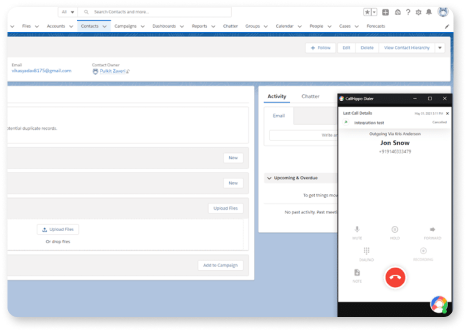
Make Calls from Salesforce

Use Salesforce’s Click-to-Dial feature to reach out faster and start talking right away. Track any assignment modifications made using IVR directly in Salesforce.

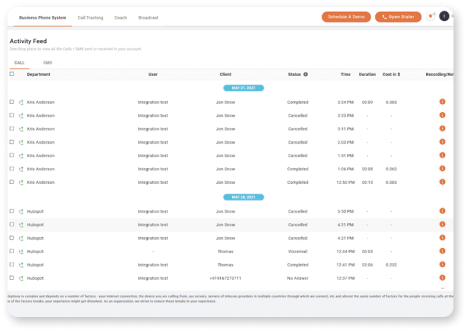
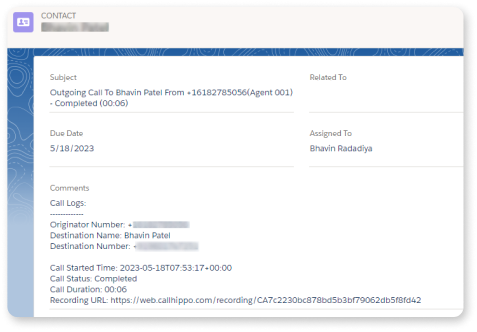
Track All Your Call Activities on Salesforce

With Salesforce connectivity, you can monitor all of your call actions straight from Salesforce or the IVR dashboard. All call logs, messages, and other activities are automatically tracked and recorded in the contact’s activity section. This eliminates the need to switch between different windows.

Access Call Recording and Voicemail

Eliminate the headache of looking for certain recordings or voicemails. Access them all directly from Salesforce and simplify your work.

Salesforce Integration Feature

Personalize Every Interaction

CallHippo instantly displays a customer’s Salesforce contact history and information when a call is connected. Agents can use this information to personalize interactions and provide optimal service.

Boost Agent Productivity

Save agents the inefficiency of switching between two applications with the ability to perform CallHippo’s actions within Salesforce. Agents will be able to create activities and update notes without ever leaving Salesforce.

Personalize Every Interaction

CallHippo’s automated workflows eliminate the need to manually enter data in two different systems. Save agents time by configuring certain CallHippo events to automatically trigger Salesforce actions.

Personalize Every Interaction

IVR instantly displays a customer’s Salesforce contact history and information when a call is connected. Agents can use this information to personalize interactions and provide optimal service.

Agile Process

Collaborative, Transparent, and Fast-Paced Delivery
Our team followed a structured Agile methodology to ensure smooth coordination between Perigeon, the client’s team, and all Salesforce stakeholders. Each development cycle focused on iterative enhancements, continuous feedback, and risk-free implementation.

How Our Agile Process Worked

Sprint-Based Execution

The entire project was delivered in short, focused sprints—ensuring every feature of the IVR and Salesforce CTI integration was tested, validated, and improved before moving to the next phase.

Dedicated Scrum Rituals
Daily standups, sprint planning, sprint reviews, and retrospectives helped our teams align quickly and resolve blockers without delays.
Continuous Client Collaboration
Clients reviewed every module—from call logging to automated workflows—to confirm that business needs and Salesforce processes were aligned in real time.
Incremental Delivery for Early Value
Instead of waiting for full completion, core features like Click-to-Dial, call tracking, and voicemail sync were deployed early so the client could experience tangible value from the start.

Salesforce QA Process

Rigorous Testing for a Seamless CTI + Salesforce Experience
To ensure a flawless and secure integration, our QA team executed a dedicated Salesforce-focused quality assurance process with detailed functional, technical, and compatibility validations.

Key Steps in Our QA Approach

Functional Testing

Verified every call action—Click-to-Dial, call logs, voicemails, agent notes—worked accurately across all Salesforce modules including Leads, Contacts, Accounts, and Opportunities.

Integration Testing

Ensured the IVR system communicated flawlessly with Salesforce APIs, confirmed real-time synchronization, and validated correct data mapping across objects.

User Acceptance Testing (UAT)

Client’s agents tested workflows in real-world scenarios. Feedback was incorporated to fine-tune automation rules, call disposition flows, and UI usability.

Security & Compliance

Checks

Verified role-based access, data security rules, encrypted call logs, and compliance with Salesforce’s security guidelines.

Performance & Load Testing

Tested how the system handled high call volumes, ensuring quick response times, stable API performance, and reliable call recording access.

Frequently asked questions

Does this IVR integration work with all Salesforce Clouds?
Yes, The QA process verified call actions across Leads, Contacts, Accounts, and Opportunities, which appear in multiple Salesforce Clouds. Since the integration relies on Salesforce CTI and standard APIs—not cloud-specific features—it is compatible with all major Salesforce Clouds where these objects and CTI are supported.

No.
Agents can make calls using Click-to-Dial inside Salesforce and track all call activities directly from Salesforce. The integration eliminates app-switching and allows agents to perform all CallHippo actions within Salesforce.

Yes.
The system automatically synchronizes contacts and activities in real time between Salesforce and CallHippo, ensuring agents always have up-to-date information.

Yes.
The solution supports automated workflows, configurable triggers, custom actions, and integration testing aligned with each client’s business processes. The Agile approach ensured iterative customization throughout the project.

Yes.
The features described—Click-to-Dial, activity logging, CTI integration, real-time sync—are all Lightning-compatible. The QA process validated functionality across Salesforce modules, which indicates Lightning Experience support.

High call volume is fully supported.
The QA team performed Performance & Load Testing, ensuring the system maintains:

  • Quick response times

  • Stable API performance

  • Reliable access to call recordings

All call recordings and voicemails are automatically logged and accessible directly from Salesforce. The integration provides a centralized place within Salesforce to store, retrieve, and review them without switching systems.

Have an Idea ?

We’d Love to Hear from you.

(*) Asterisk denotes mandatory fields

    • By sending this form, I confirm that I have read and accepted the Perigeon Privacy Policy.

    Success Stories

    Discover how our innovative app and web solutions have driven growth for our clients. Experience enhanced engagement and measurable success. Partner with us for transformative results.