


Salesforce Flow continues to evolve into one of the platform’s most important automation tools. With Winter ’27, Salesforce is introducing a broad set of improvements focused on Flow testing, screen flows, security, usability, performance, governance, and overall Flow management.
Some of these updates are major functional improvements, while others address everyday frustrations that Salesforce Admins and Developers encounter when building and maintaining automation.
From a new dedicated Test Mode and Flow Tags to bulk processing with Screen Flows and a modernized Flow Builder experience, Winter ’27 gives teams more control over how they build, test, organize, and maintain their automations.
Here are 17 Salesforce Flow features worth knowing in Winter ’27.
1. Organize and Discover Flows with Flow Tags
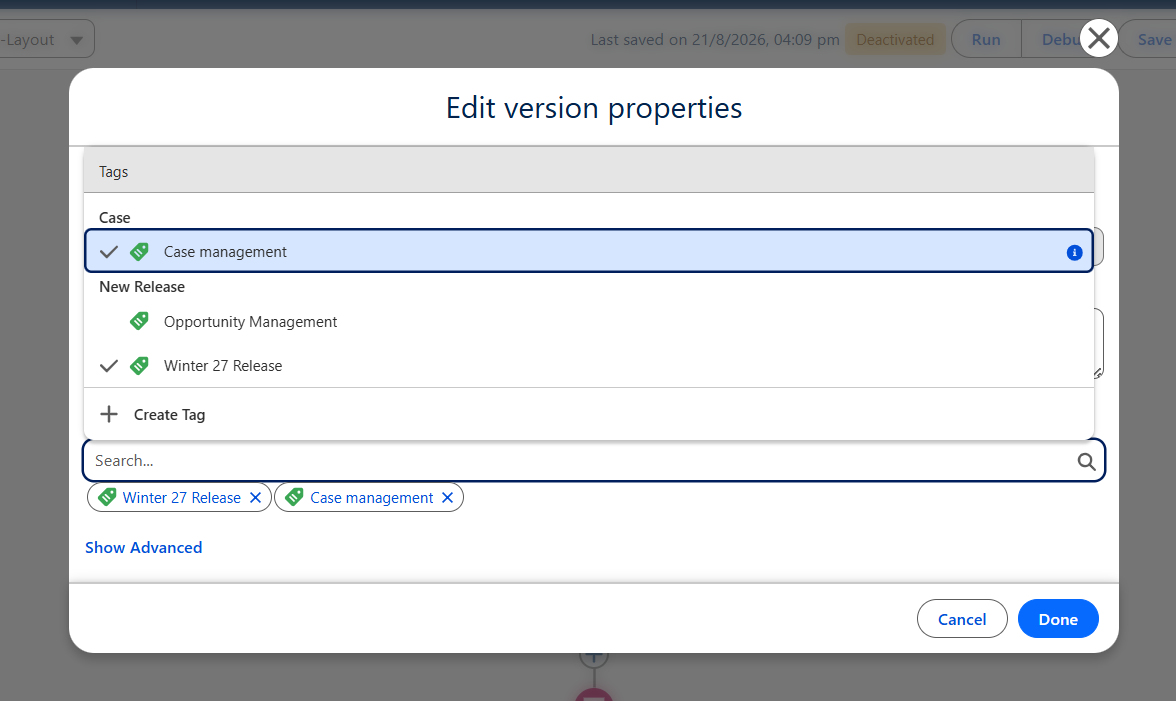
Managing a large Salesforce org can quickly become difficult when dozens or even hundreds of Flows are involved.
Winter ’27 introduces Flow Tags, allowing teams to classify Flows using custom tags. Tags can be organized into categories, making it easier to identify Flows based on their purpose, object, business process, or implementation area.
For example, an organization could create tags such as:
- Sales
- Service
- Manufacturing
- Subflow
- Data Processing
- Approval
- Integration
This can make Flow discovery and administration much easier as an org grows.
Why it matters: Better Flow organization can reduce maintenance time and make handovers between Admins and Developers easier.
2. Test Flows with the New Test Mode
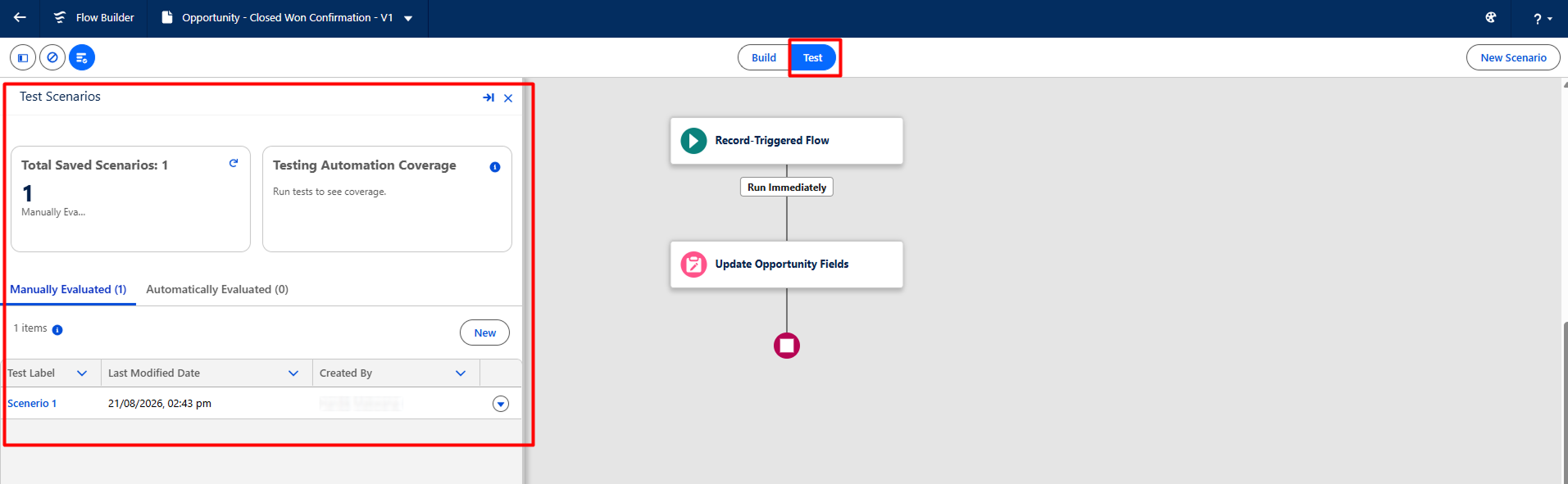
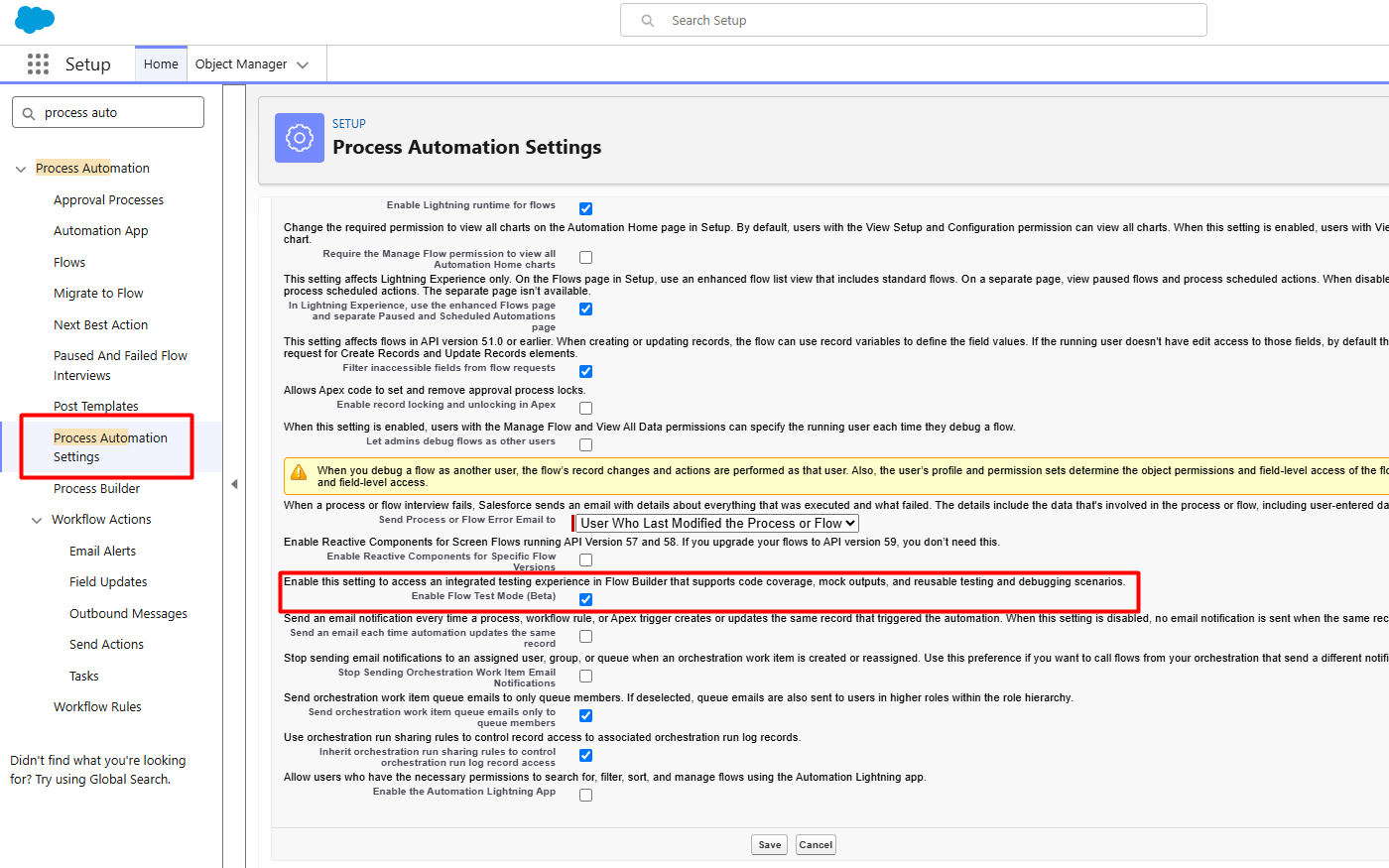
One of the biggest improvements in Winter ’27 is the introduction of a dedicated Test Mode for Flow Builder, currently available in Beta.
The new experience brings Flow testing into a more structured environment, allowing teams to create repeatable tests instead of relying exclusively on one-off debugging sessions.
Saved test scenarios can help teams repeatedly validate automation after making changes.
Why it matters: Repeatable testing can improve confidence when modifying complex Flows and reduce the risk of introducing regressions.
For teams managing business-critical automation, this is one of the Winter ’27 Flow features worth evaluating early.
3. Trigger Marketing Cloud Flows Faster on Order Events
Marketing Cloud Flow Builder receives an important performance improvement for order-related events.
Flows can now respond to events such as:
- Order Return
- Order Shipment
- Order Status Change
using a REST API-based approach.
The processing time is significantly reduced compared with the previous waiting period, making these event-driven automations much more responsive.
This capability applies to supported Marketing Cloud Growth and Marketing Cloud Advanced editions.
Why it matters: Faster event processing can improve the timeliness of customer communications and downstream marketing automation.
4. Copy Audience Flows Without Disrupting Live Campaigns
Marketing Cloud users also gain more control when copying Audience Flows.
Winter ’27 allows teams to decide whether associated email, SMS, WhatsApp, and RCS assets should be copied or continue referencing the original assets.
Segments and list-trigger definitions can also be copied so that the new Flow has its own starting configuration.
Why it matters: This provides a safer way to create variations of existing campaigns without unintentionally affecting live customer journeys.
5. Process Multiple Records with Screen Flows
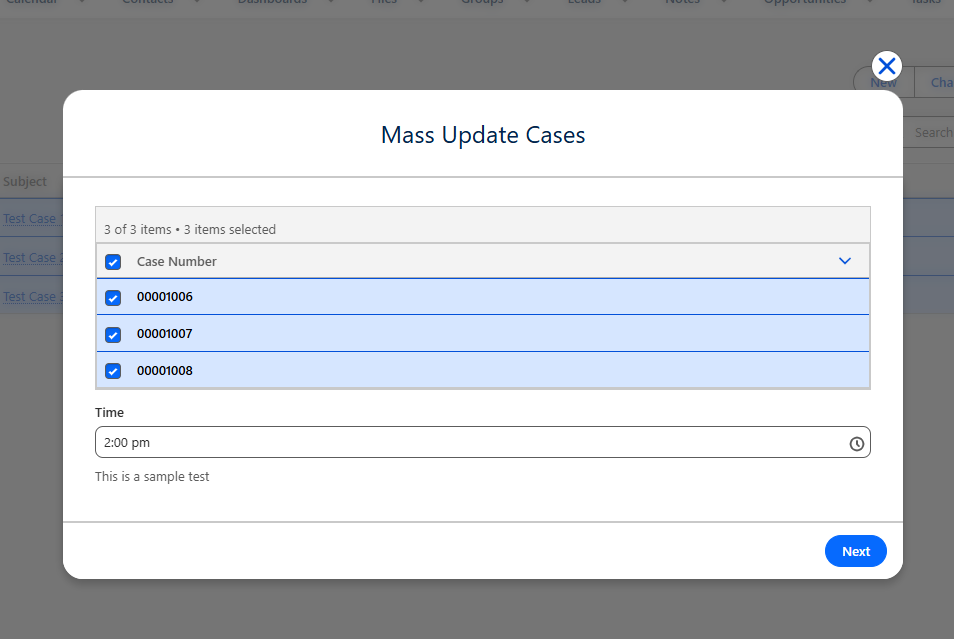
Screen Flows become much more useful for bulk operations in Winter ’27.
You can now launch a Screen Flow from a List View or Related List and pass multiple record IDs into the Flow.
The records are provided through a Text Collection named ids, allowing the Flow to process multiple selected records.
This opens up new possibilities for business users who need to perform guided actions across multiple records without creating complicated workarounds.
Example: A service team could select several records from a list and launch one guided Flow to perform the same business process across them.
Why it matters: Admins can build more user-friendly bulk operations while keeping the experience inside Salesforce.
6. Control the Screen Flow Quick Action Window Size
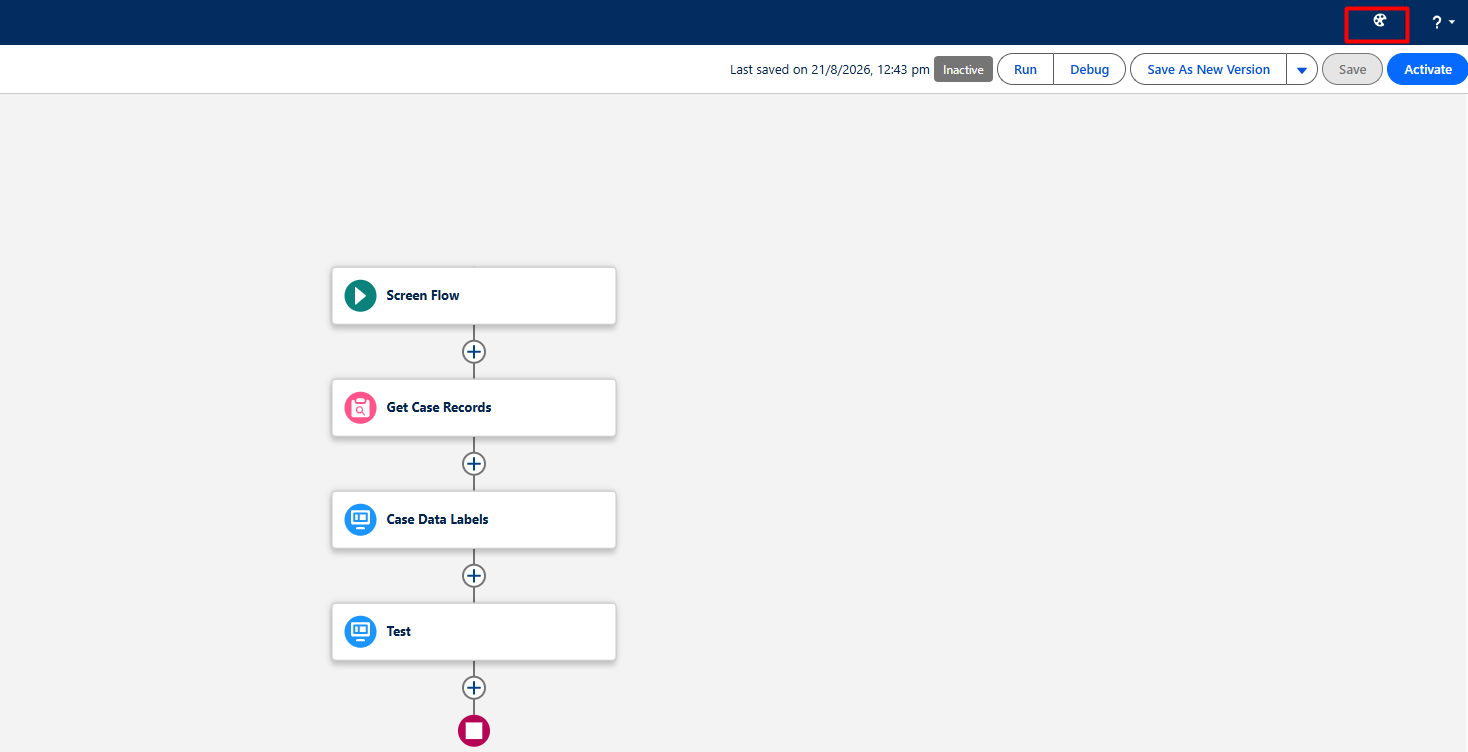
Screen Flows launched through Quick Actions have another useful improvement: customizable window sizing.
Admins can specify the size of the modal window used when a Screen Flow is launched as a Quick Action.
This is particularly useful for Flows containing multiple fields, longer instructions, or more complex screen components.
Why it matters: Better control over the Flow window can create a cleaner user experience and reduce unnecessary scrolling.
7. Reactive Formulas Improve Conditional Visibility
Conditional visibility is an important part of building dynamic Screen Flows.
Previously, formulas referencing values entered or changed on the current screen could create limitations when determining whether another component should be displayed.
Winter ’27 improves this behavior through reactive formulas, allowing visibility rules to respond more effectively to values on the current screen.
Example: A Flow can dynamically display additional questions based on an answer the user has just provided.
Why it matters: This makes Screen Flows more interactive and can reduce the need for additional screens or complicated logic.
8. Detect Missing Required Fields Before Saving
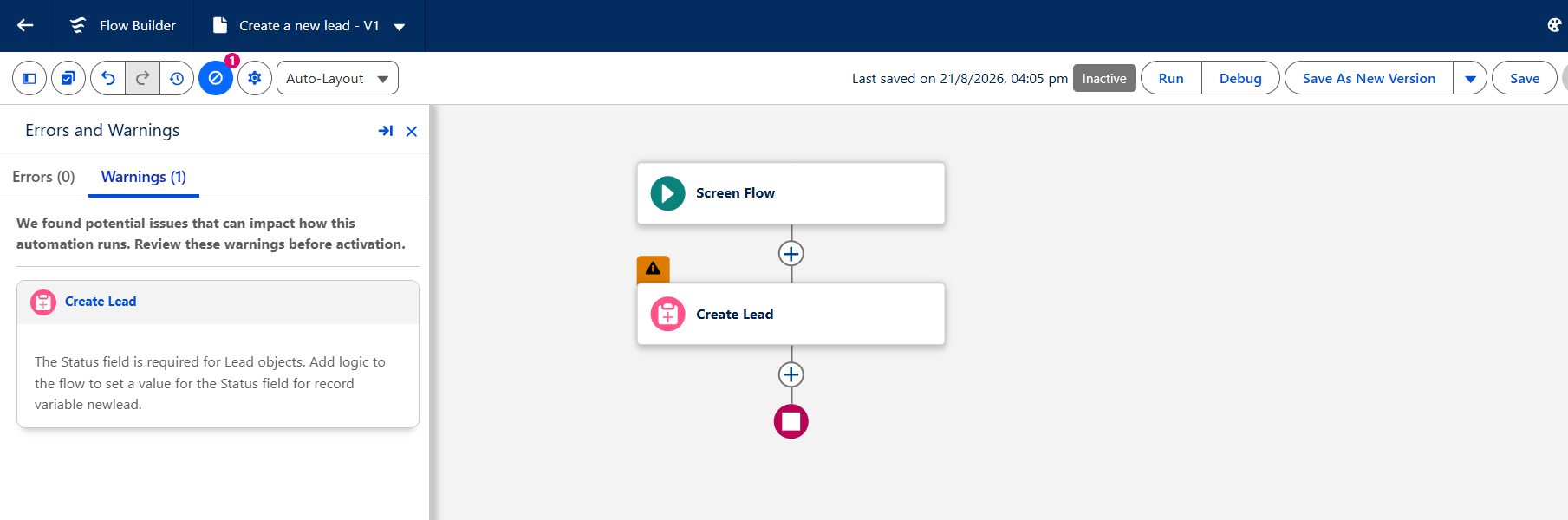
A Flow that fails because a required field wasn’t populated can be frustrating to troubleshoot.
Winter ’27 adds validation that can identify missing required-field assignments when a Create Records element uses a record variable.
Instead of discovering the problem later during execution, Flow Builder can warn the builder earlier.
Why it matters: Catching configuration problems during development can reduce runtime failures and make Flow troubleshooting easier.
9. Detect Field-Length Violations Earlier
Another useful validation improvement addresses values that exceed a field’s maximum length.
Winter ’27 can identify field-length issues during Flow configuration, helping builders catch potential problems before the Flow runs.
This is especially useful when Flow logic assigns values dynamically or combines data from multiple sources.
Why it matters: Earlier validation can prevent avoidable runtime errors and improve Flow reliability.
10. Enforce User Permissions When a Flow Runs
Security and data access are critical considerations when implementing Salesforce automation.
Winter ’27 introduces a Flow run-context option that allows a Flow to enforce the running user’s permissions, regardless of how the Flow is invoked.
With the appropriate user-context setting, the Flow operates based on the access available to the user running it.
This can help organizations design automation that aligns more closely with their Salesforce security model.
Why it matters: Flow security should be considered during design, not treated as an afterthought. Admins should review existing automation and determine whether user-context execution is appropriate for sensitive processes.
11. Preserve End Element Positions
Flow Builder’s End elements now receive better metadata representation.
Winter ’27 saves End element positioning information in the Flow metadata rather than relying only on the Flow Builder interface to reconstruct it.
This is particularly useful when Flows are managed through development and deployment processes outside the standard Flow Builder experience.
Why it matters: More complete metadata representation can make Flow development, version control, and external tooling more predictable.
12. Navigate Flow Builder with Keyboard Shortcuts
Winter ’27 introduces additional keyboard navigation capabilities within Flow Builder.
Admins and Developers can move between Flow elements and navigate across branches more efficiently.
Standard keyboard shortcuts such as copy and paste are also supported.
Why it matters: This may look like a small improvement, but keyboard navigation becomes increasingly valuable when working with large and complex Flows.
13. Navigate Flow Comparison Results More Easily
Flow version comparison also receives a usability improvement.
When comparing different versions, users can now navigate through individual changes and access additional details without relying on a crowded comparison view.
This makes it easier to understand what changed between versions.
Why it matters: Better version comparison supports troubleshooting, governance, peer reviews, and deployment validation.
14. Find Unused Resources with a New Filter
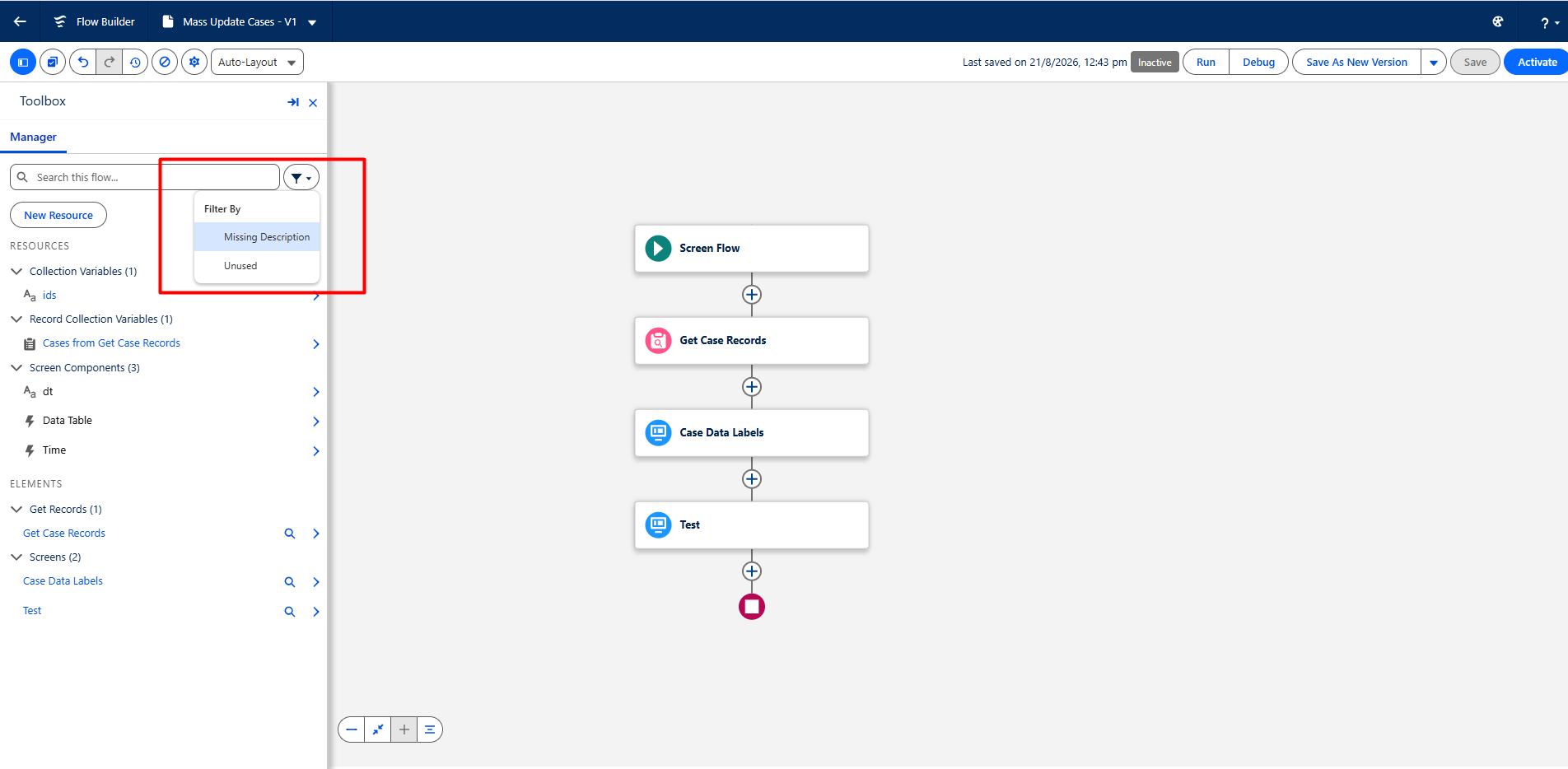
Over time, Flows can accumulate unused variables, formulas, resources, and other configuration components.
Winter ’27 introduces an Unused Resources filter that helps identify resources that are no longer being used.
The filter can also help surface resources that lack descriptions.
This gives Admins an easier way to identify technical debt inside existing Flows.
Why it matters: Cleaning unused resources can make Flows easier to understand, maintain, and hand over to another administrator.
15. Group Flow Elements for Better Organization
Large Flows can become difficult to navigate, especially when several elements belong to the same logical process.
Winter ’27 introduces Groups, allowing builders to organize related Flow elements together.
Groups can have their own labels and descriptions and can be collapsed or expanded on the canvas.
For example, an order-processing Flow could contain separate groups for:
- Validate Order
- Calculate Pricing
- Update Records
- Send Notifications
Why it matters: Groups improve Flow readability without requiring developers to break every section into a separate Subflow.
16. Track Changes with Flow Edit History
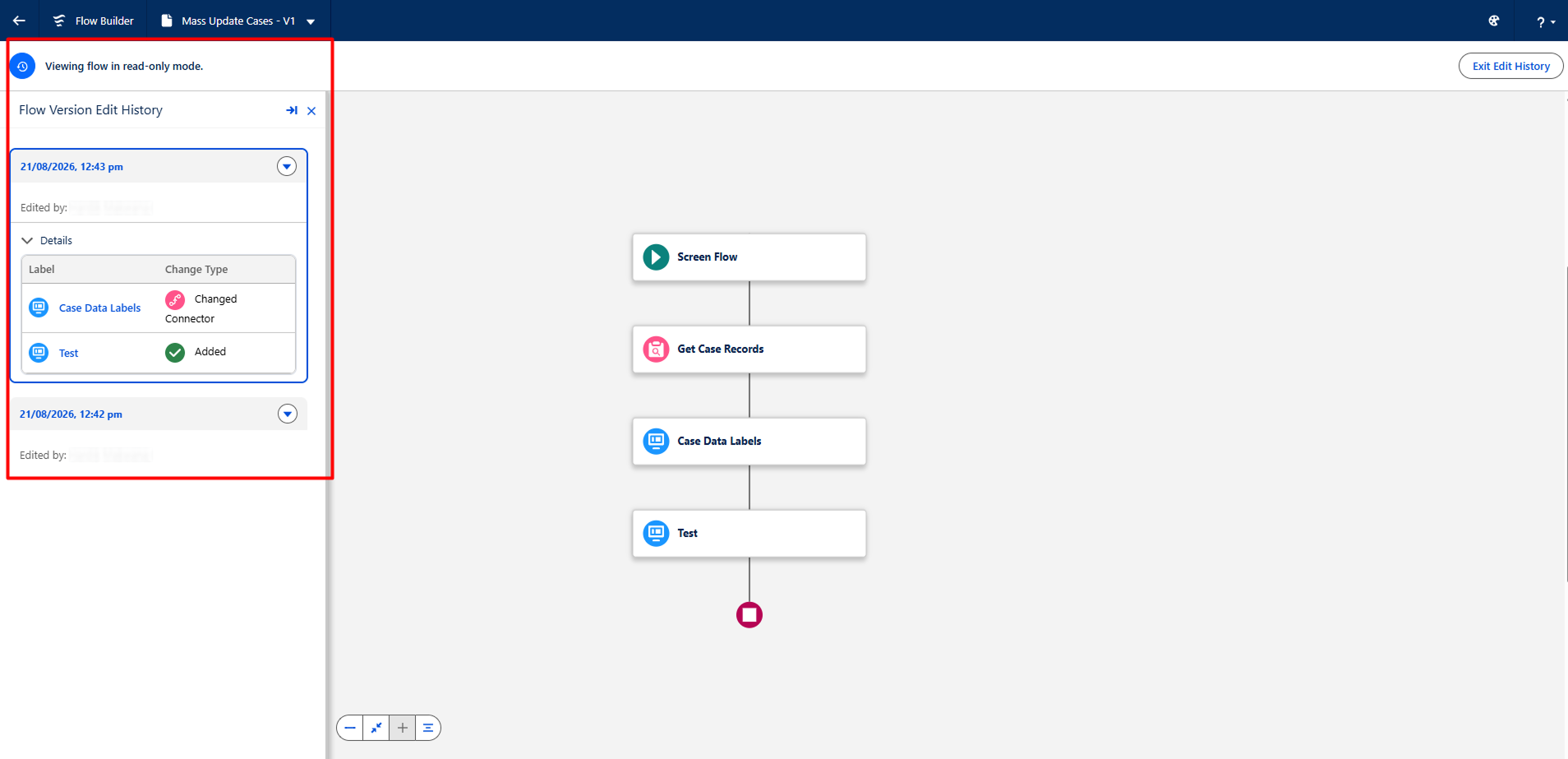
Winter ’27 adds a new Edit History experience for supported Flow types.
Instead of only looking at saved versions, Admins can review a timeline of saves for the current Flow version and see which elements were added, modified, or deleted.
Earlier save states can also be restored.
Salesforce’s documentation notes that Edit History is available for supported Marketing Cloud flow types, including automation event-triggered, audience, activation-triggered, and on-demand Flows; it isn’t available for Screen Flows, record-triggered Flows, or orchestrations.
Why it matters: This can make troubleshooting and collaboration significantly easier when multiple people are working on automation.
17. Flow Builder Gets the Modern Salesforce Cosmos Experience
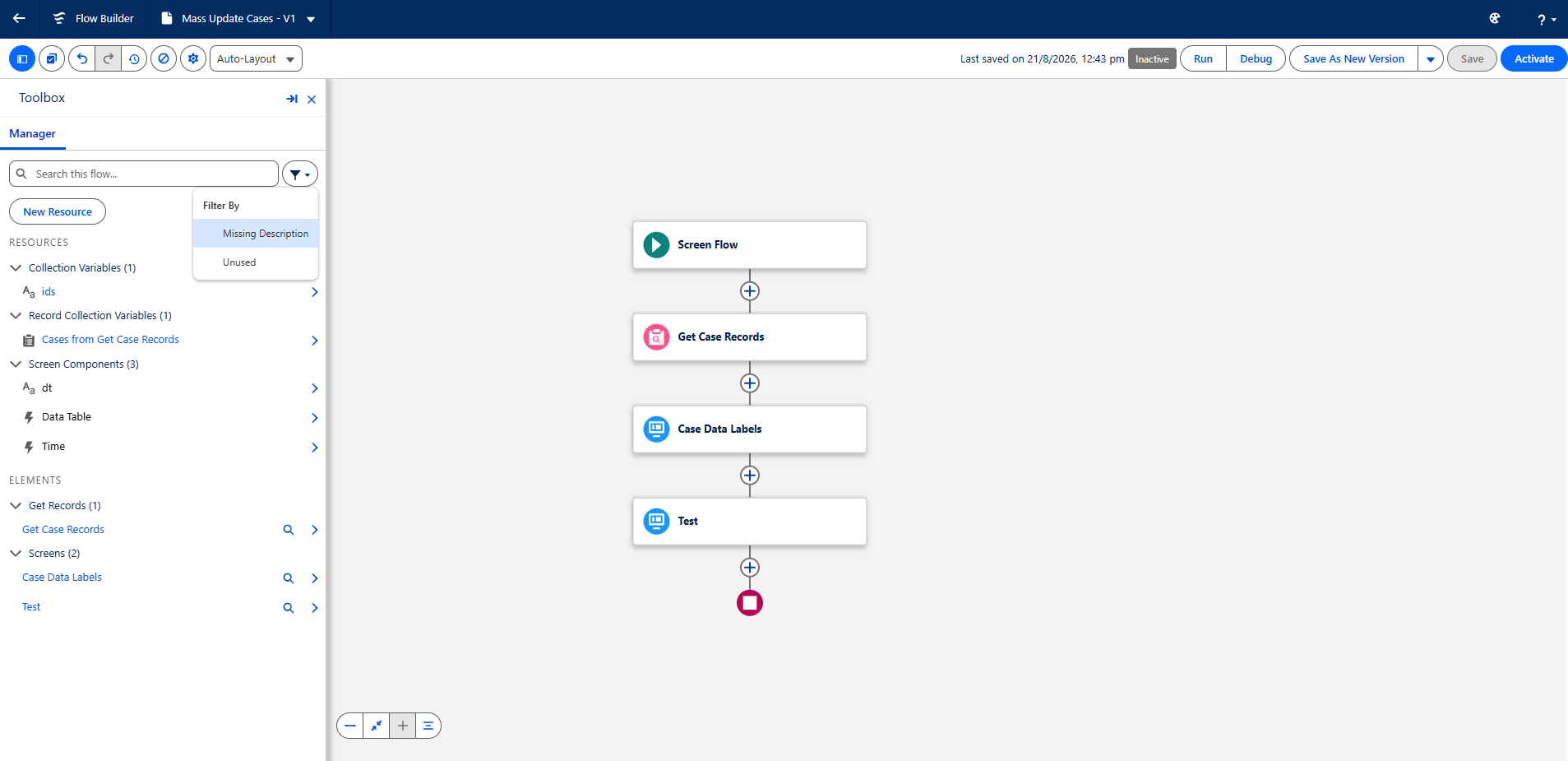
Winter ’27 also gives Flow Builder a visual refresh through support for the Salesforce Cosmos Theme and SLDS 2.
The updated interface brings Flow Builder closer to the modern Salesforce experience users see across the platform.
While this doesn’t fundamentally change how a Flow executes, it improves the overall builder experience.
Why it matters: A consistent interface makes the platform easier to navigate and gives Flow Builder a more modern look and feel.
What These Winter ’27 Flow Updates Mean for Salesforce Teams
The most important takeaway from Winter ’27 isn’t a single new Flow element.
It’s the broader direction of Salesforce Flow.
Salesforce is improving Flow across several areas at the same time:
Better Development
Test Mode, keyboard navigation, improved validation, and better Flow comparison make it easier to build and troubleshoot automation.
Better User Experiences
Screen Flow improvements such as reactive formulas, bulk processing, and configurable Quick Action windows give Admins more flexibility when designing guided experiences.
Better Governance
Flow Tags, Groups, Unused Resources, and Edit History can help organizations manage technical debt and understand their automation landscape.
Better Security
The ability to enforce user permissions through Flow run context gives teams another option for designing automation around their security requirements.
Better Maintainability
Metadata improvements and enhanced version comparison can make Flows easier to manage as organizations move toward more structured development and deployment practices.
Which Winter ’27 Flow Features Should You Prioritize?
Not every feature needs immediate adoption.
For most Salesforce teams, the following should be high on the evaluation list:
- Test Mode
Evaluate it for your Flow testing and QA process. - User Permission Enforcement
Review security-sensitive Flows and determine whether user-context execution is appropriate. - Screen Flow Bulk Processing
Look for manual processes where users repeatedly perform the same action across multiple records. - Reactive Formulas
Review Screen Flows that currently rely on extra screens or complicated workarounds for dynamic behavior. - Flow Tags and Groups
Use them to improve organization in large or rapidly growing orgs. - Edit History and Flow Comparison
Consider how these capabilities can fit into your Flow governance and change-management process.
Preparing Your Salesforce Org for Winter ’27
Before enabling or adopting new Flow capabilities, Salesforce teams should test them in a sandbox or preview environment.
Salesforce’s Winter ’27 sandbox preview window begins August 28, 2026, and Salesforce recommends using the preview period to test configurations before production upgrades.
A practical preparation process is:
- Inventory your existing Flows.
- Identify business-critical automation.
- Review Flows with frequent failures or maintenance issues.
- Test the new Flow features in a sandbox.
- Review security and user-context requirements.
- Clean up unused Flow resources.
- Establish naming, tagging, and documentation standards.
- Test deployments and integrations.
- Train Admins and Developers on the new capabilities.
- Roll out changes gradually to production.
Final Thoughts
Winter ’27 is a significant release for Salesforce Flow.
The improvements go beyond adding new functionality. Salesforce is addressing the entire Flow development lifecycle—from building and testing to security, organization, troubleshooting, deployment, and maintenance.
For Salesforce Admins, features such as Flow Tags, Groups, reactive formulas, and improved validation can make everyday Flow development easier.
For Developers and technical teams, Test Mode, Flow comparison, Edit History, metadata improvements, and stronger security controls can help create a more disciplined automation development process.
The biggest opportunity is not simply to turn on every new feature. Instead, use Winter ’27 as an opportunity to review your existing automation and identify where these improvements can make your Salesforce org more reliable, maintainable, secure, and scalable.
As with any Salesforce release, test new capabilities in a sandbox first and confirm feature availability and edition requirements before moving changes into production.
Need help reviewing or improving your Salesforce automation strategy?

A Salesforce consulting partner can help assess existing Flows, identify automation gaps and technical debt, and build scalable automation aligned with your business processes.